
Staff attendance for African businesses
Know who came to work today. No machine to buy.
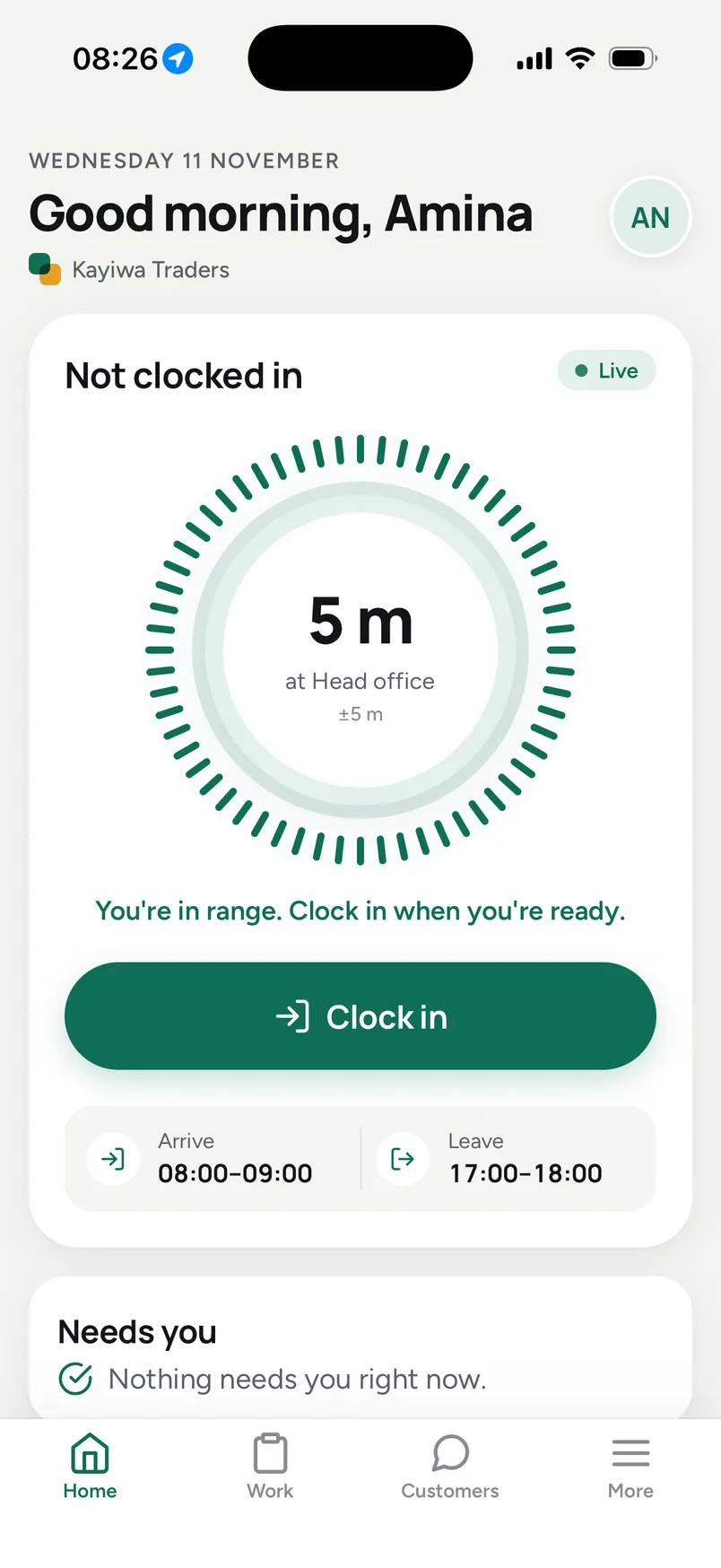
Your team clocks in on the smartphones they already carry, and only when they are actually at the office. Late arrivals, absences and the month's hours add up on their own, ready for payroll.
14-day free trial · No card needed · Nothing to install
Everything a clocking machine does, without the machine
Fingerprint and card readers cost money before anyone has clocked in, and they break, jam and get queued at. Your team already carries a better one.
| Topic | Fingerprint or card machine | AfriBMS on your team's phones |
|---|---|---|
| What you buy | A reader for every entrance, then installation and someone to fix it. | Nothing. Each person uses their own smartphone. |
| Dusty, wet or worn fingers | The reader fails to match, and the queue at the door grows. | One tap on a button. No finger, card or PIN needed. |
| Clocking in for a friend | A card or a PIN can be handed to a colleague. | Each person signs in as themselves, and the server checks the phone is at your office. |
| Opening a new branch | Another machine, another installation. | Drop a pin on the map and set a radius. Staff there clock in the same morning. |
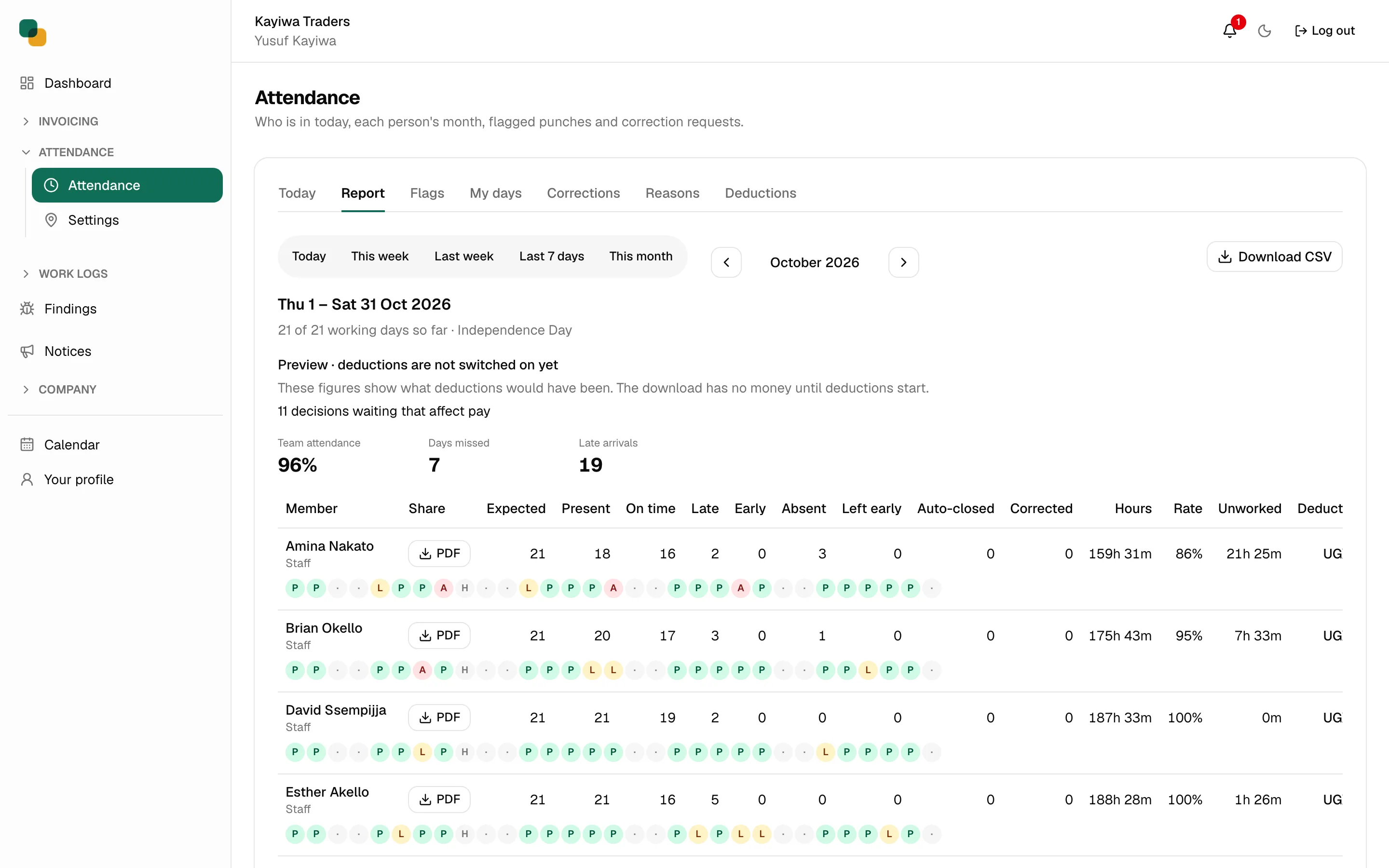
| The month-end report | Download the punches and rework them in a spreadsheet. | Late, absent, leave and public holidays already counted. Download the CSV or each person's PDF. |
What you buy
With a machine: A reader for every entrance, then installation and someone to fix it.
With AfriBMS: Nothing. Each person uses their own smartphone.
Dusty, wet or worn fingers
With a machine: The reader fails to match, and the queue at the door grows.
With AfriBMS: One tap on a button. No finger, card or PIN needed.
Clocking in for a friend
With a machine: A card or a PIN can be handed to a colleague.
With AfriBMS: Each person signs in as themselves, and the server checks the phone is at your office.
Opening a new branch
With a machine: Another machine, another installation.
With AfriBMS: Drop a pin on the map and set a radius. Staff there clock in the same morning.
The month-end report
With a machine: Download the punches and rework them in a spreadsheet.
With AfriBMS: Late, absent, leave and public holidays already counted. Download the CSV or each person's PDF.
Running by tomorrow morning
Set it up this afternoon, and tomorrow's arrivals are on the board as they happen.
Put your office on the map
Add each office, shop or site with a radius, and set the hours you expect people to arrive and leave.
Invite your team by email
Each person signs in from their phone's browser. Nothing to install, and it works on Android and iPhone.
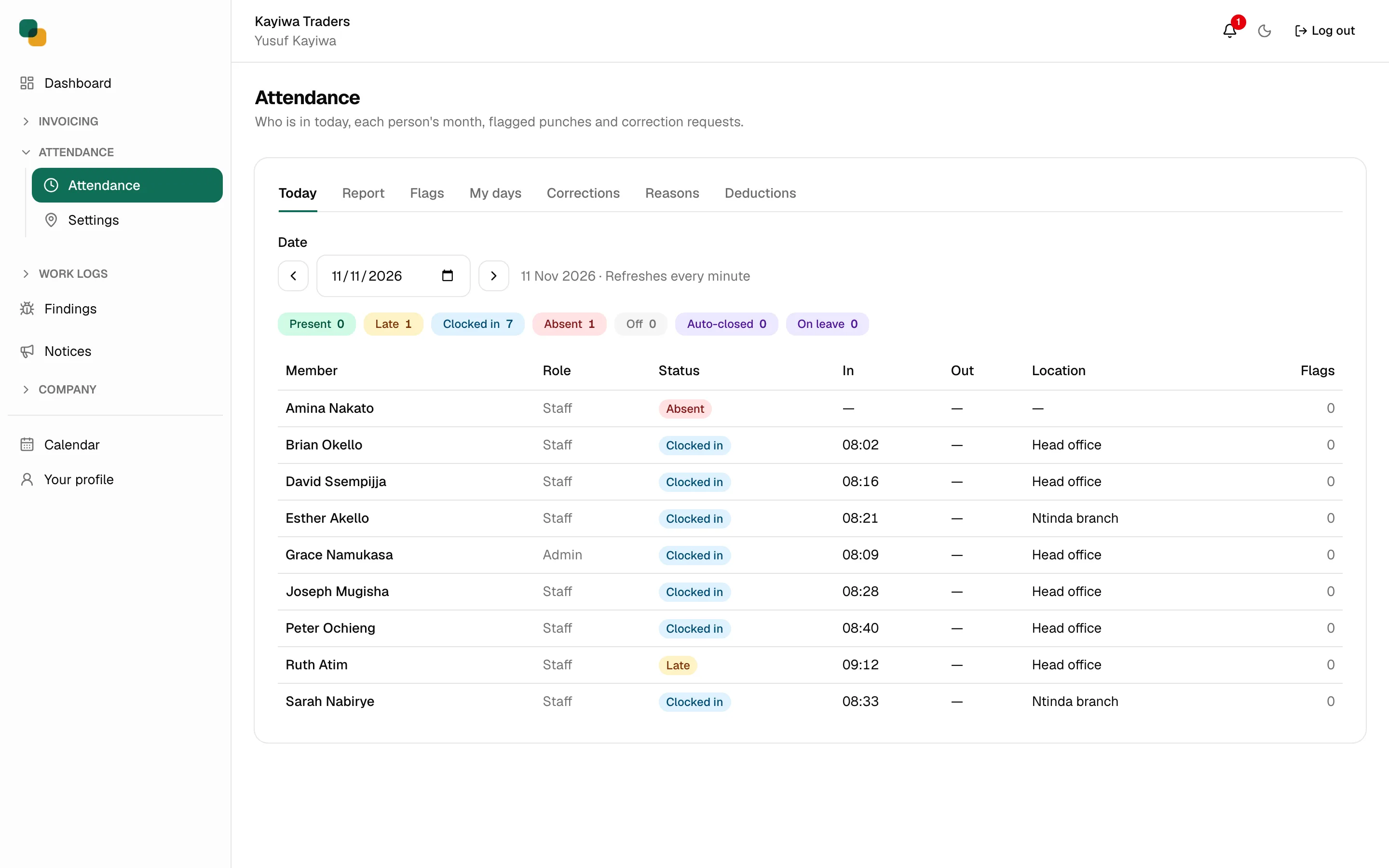
See who is in, live
Present, late and absent on one board, every branch together. At month end the report is already done.
Honest hours, without the argument
The month's report is the record, not a debate: who was late, who was absent, who was on leave, and what that adds up to before payroll.
- Only at the office
- The server measures the phone's distance to your location and refuses a clock-in from outside it. A claim from the phone is never trusted on its own.
- Late by your rules
- Your arrival and departure windows, in your time zone. A forgotten clock-out is closed for you and marked for review, not counted as a full day.
- Holidays and leave counted right
- Your country's public holidays are loaded for the year, and approved leave never shows as an absence.
- No tracking between punches
- The phone shares its location only at the moment someone clocks in or out. Fake-location tricks are flagged for you to review.
Then run the rest of the business on the same login
21 modules, all live and all in every plan. Attendance feeds leave and payroll; customers flow from a quote to an invoice to the ledger. Nothing is typed twice.
Your people
Who came in, who is off, who does what, and what they are paid.
- Attendance
Geofenced clock-in, honest hours and a monthly report.
- Leave
Leave requests, balances and approvals, switched on when your company needs them.
- Shift rota
Plan who works when, week by week; each person sees their shifts on their phone and hears when they change.
- HR and payroll
Monthly pay runs with tax and social security worked out, payslips on the phone, and the returns ready to upload.
- Payslips
Each month's payslip uploaded as a PDF and opened by the employee on their phone, private to them.
- Work logs
Daily work logs with metrics your team defines, reviewed by a manager.
- Tasks
Managers give out tasks with a due date; staff see them on the phone, mark them done and talk them over.
- Requests desk
Overtime, early leave, equipment, letters and salary advances asked for from the phone and approved in one place.
- Expenses
Staff claim what they spent with a photo of the receipt; a manager approves and marks it paid.
- Client visits
Staff check in at a customer or a place with one tap: who, where and when, with a note and a photo.
- Announcements
Team announcements with read receipts, pushed to every phone.
- Kudos and celebrations
Staff thank each other from the phone, and the team sees today's birthdays and work anniversaries.
- Findings
Staff report problems with a screenshot; managers triage and reply.
- Equipment
Company phones, laptops, tools and vehicles: who has each one and when it comes back.
Your money
What you are owed, what you owe, and what is on the shelf.
- Invoicing
Invoices, payments and customer statements that get you paid.
- Bills
Suppliers and the bills you pay, and a month of money in and out.
- Petty cash
Cash boxes topped up and spent against approved requisitions, with a running balance and a receipt for every spend.
- Products and inventory
Stock levels, suppliers and purchase orders in one place.
- Accounting
Bank accounts, the ledger and the reports your accountant asks for.
Your customers
From the first enquiry to the answered question.
- Sales and CRM
Leads and deals that turn into quotes and invoices.
- Customer Relations
A client portal where your customers raise requests and get answers from an AI that knows your business.
And invoices your customers can pay from their phone
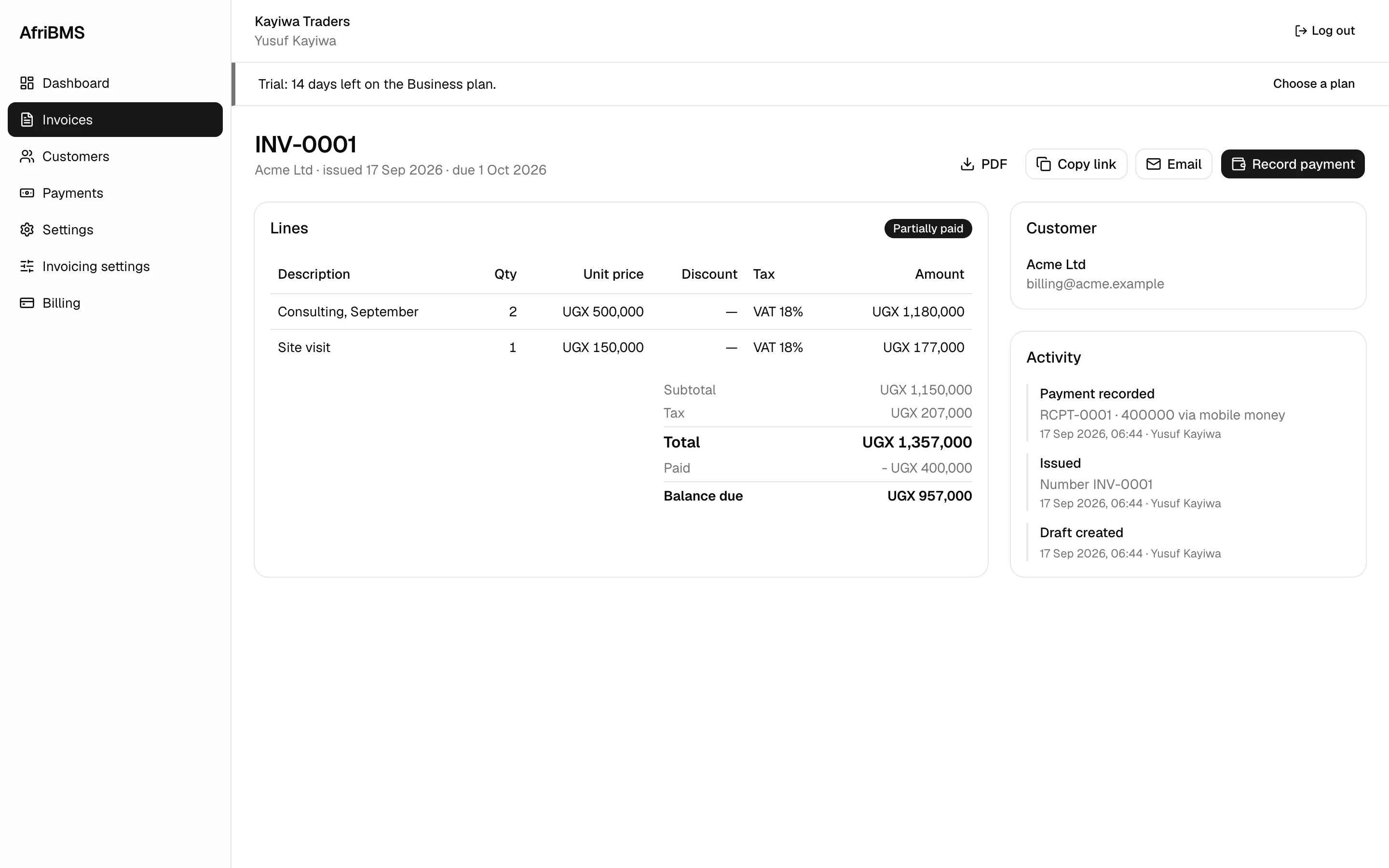
Bill in your own currency, take payment by mobile money, bank transfer or cash, and keep the VAT right.
- Mobile money
- Record MTN, Airtel, M-Pesa and other mobile money payments against the right invoice.
- Your own currency
- Bill in shillings, kwacha, naira, cedi, rand or francs, and in US dollars when you invoice abroad.
- VAT-ready
- VAT lines, rates and your tax number on every invoice your accountant will see.
- Shared on WhatsApp
- Send the invoice link on WhatsApp. It opens in any browser, with nothing to install.
Every module in every plan. Pay for your people.
No machine, no setup fee. Prices are in US dollars; choose shillings or kwacha to see today's price, and a year up front costs 2 months less.
Starter
For a small team getting started.
USD 9.99 per month
3 people included, then USD 3 a person a month
Business
For a growing team of ten or more.
USD 29.99 per month
10 people included, then USD 2 a person a month
Enterprise
For larger teams that want priority support.
USD 99.99 per month
30 people included, then USD 1 a person a month
Questions we get asked
Do we need a fingerprint or card machine?
No. Your staff clock in on their own smartphones, Android or iPhone, in the phone's browser. The only things you set up are your office locations and working hours.
How do you know someone is really at the office?
When someone taps clock in, the phone sends its location once, and our server measures the distance to the nearest of your locations. Outside the radius, the clock-in is refused and the person sees how far away they are.
Does it track my staff all day?
No. The location is read only at the moment someone clocks in or out. Nothing is collected in between.
We have several branches. Does that work?
Yes. Add every branch or site with its own radius. People clock in wherever they are working that day, and the board shows who is at which branch.
What else is in AfriBMS?
Leave, shift rotas, payroll and payslips, expenses, tasks and announcements for your people, and invoicing, bills, stock and accounting for your money. Every module is in every plan.
Where does AfriBMS work?
Across Africa. Choose your country when you sign up and AfriBMS sets your currency, time zone and public holidays.
What happens after the free trial?
The trial runs for 14 days with every module on. At the end you choose a plan and pay, or stop. No card is taken up front, so nothing is charged automatically.
Take tomorrow's attendance on your team's phones
Add your office and invite your team today. Tomorrow morning, watch them clock in.
14-day free trial · No card needed · Nothing to install